Wellness sessions · Ergonomics
Office Ergonomics Training for Employees
Office ergonomics training for employees teaches people who sit at screens all day how to set up their workstation, sit and move so that neck pain, back ache, wrist strain and tired eyes are less likely — at the office and at a home desk.
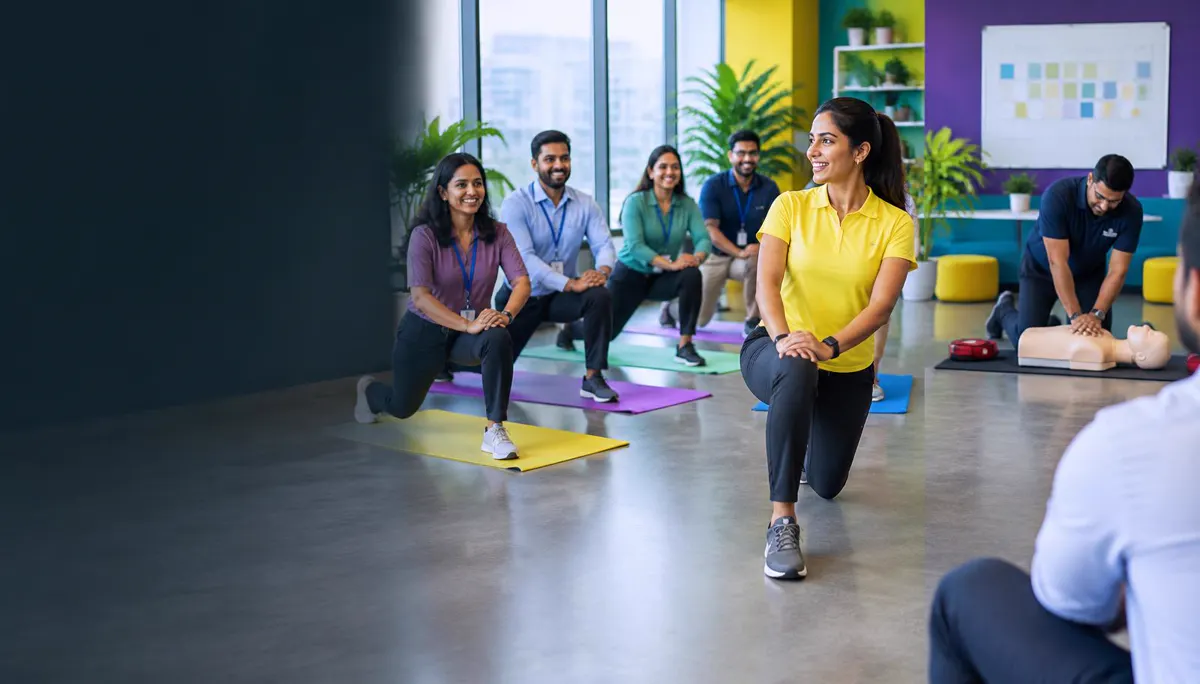
Plan My Health runs practical ergonomics sessions led by physiotherapists and doctors for corporate offices, IT and tech companies, BFSI operations and commercial parks. Employees adjust their own chair and screen during the session, and you can add optional one-to-one workstation assessments for people who already have pain.
~10 years in corporate health · PAN-India delivery · Trusted by teams at








Onsite
At your office, plant or site
Online
Live video with joining links
Hybrid
One session, every location
What ergonomics training covers
- Workstation set-up — chair height, back support, desk height, monitor distance and keyboard and mouse position
- Laptop use — stands, external keyboards and what to do when you only have a laptop
- Posture and movement — why the best posture is the next one, micro-breaks and simple desk stretches
- Back and neck pain — common causes in desk work, early self-care and when to see a doctor or physiotherapist
- Eye strain — screen brightness, glare, the 20-20-20 habit and when to get an eye test
- Hybrid and home desks — making a dining table or bedroom corner workable on a small budget
- Standing, walking meetings and building movement into the working day
Who delivers ergonomics training
Sessions are led by qualified physiotherapists, with an MBBS doctor for talks that focus on pain, eye health or when to seek care. Speaker profiles are shared before the date.
For optional workstation assessments, a physiotherapist visits desks one by one, checks set-up against the employee's height and tasks, suggests adjustments and notes any equipment the facility team may need to consider. Advice goes to the employee; the facility team receives only the equipment list.
Onsite, online and hybrid formats
Onsite ergonomics sessions work best when employees can bring their own chair or laptop to the room, or the trainer can walk the floor afterwards to adjust desks. Online sessions on Teams, Zoom or Google Meet reach hybrid and multi-city teams, and are easy to repeat for different shifts. Hybrid sessions put one expert in front of an onsite room and a live online audience at the same time.
Most sessions run 30 to 60 minutes with time for questions. Longer workshops and series of four to six sessions can be planned when a topic needs practice and follow-up rather than a single talk.
How to plan office ergonomics training
- Share headcount, locations, work patterns and any topics employees have asked for
- Tell us about your furniture, laptop policy and how many people work from home part of the week
- Decide whether to add workstation assessments, and for which teams or floors
- Agree date, format, language and the person who will host on your side
- Promote the session through internal channels a week ahead, with a reminder on the day
- Review attendance and anonymous feedback together and decide the next topic
What HR receives
- A short session plan with topic outline, speaker profile and format before the date
- Promotion text and a poster your internal communications team can use
- Floor-wise list of common set-up issues and equipment suggestions, if workstation assessments are included
- A one-page desk set-up checklist employees can keep
- Attendance count and anonymous feedback summary after the session
- Suggested next topics, linked to your wellness calendar
Who office ergonomics training for employees is for
- Corporate offices — ergonomics training planned around working hours, meeting rooms and lunch slots, for one floor or several locations
- IT and tech companies — ergonomics training for screen-heavy, hybrid and late-shift teams, with online sessions that reach every city in one go
- BFSI — ergonomics training for branch, operations and contact-centre teams with targets, long sitting hours and rotating rosters
- Commercial and business parks — ergonomics training offered to tenant companies across a campus, coordinated with the facility team
Linking ergonomics with yoga, fitness and checkups
Ergonomics improves the desk; movement improves the body. Many companies follow the training with desk yoga or a fitness challenge, and add eye and posture checks to the annual checkup.
Medical governance
- Qualified MBBS doctors lead every clinical service; AFIH-qualified doctors are deployed where a process requires one.
- Trained nurses (GNM, BSc or ANM) and paramedics work under doctor oversight and written protocols.
- Clinical oversight: reports and fitness opinions are reviewed by a doctor, with escalation for abnormal results.
- Confidentiality: individual health records are shared only with the employee; HR receives aggregate data and the fitness opinions a role legally needs.
- Data privacy: records are stored digitally with access limited by role.
Frequently asked questions
What is the difference between ergonomics training and a workstation assessment?
Training is a group session where everyone learns to set up their own desk. A workstation assessment is a one-to-one check of a specific person's desk by a physiotherapist. Most companies run training for everyone and assessments for people with pain or special requirements.
Can you cover employees who work from home?
Yes. Online sessions include home desk set-up, and employees can show their home workstation on camera for advice during an online assessment.
Do employees need to bring anything?
For onsite sessions, employees can bring their laptop or sit at their own desk if the trainer walks the floor. For online sessions, they join from where they usually work.
Will you tell us which chairs or equipment to buy?
We describe what features the equipment should have, such as adjustable seat height and lumbar support. We do not sell furniture or recommend specific brands.
Can ergonomics training help existing back pain?
It can reduce strain from poor set-up and habits. Persistent or severe pain needs assessment by a doctor or physiotherapist, and the trainer will advise employees to seek care when needed.
How many employees can attend one session?
Talks work for large groups online. For hands-on onsite sessions, smaller groups of around 20 to 40 allow the trainer to help with individual set-ups.
How is the price worked out?
Every proposal is a custom quote based on headcount, number of shifts, the sites involved and the scope you choose. We do not charge for the first consultation.
How do I request a proposal?
Use the proposal form on this page, call +91 8356928929 or +91 9820891087, WhatsApp us, or email akshay@planmyhealth.in. We reply within one working day.
Related services
Guides for HR and EHS teams
Cities we serve
Get a quote in 24 hours
Share your company, city, headcount and the service you need — we reply within one working day with a scope and quote.